使用 Visual Studio Code 在 Microsoft Fabric 中进行数据科学
你可以在VS Code中为Microsoft Fabric构建和开发数据科学和数据工程解决方案。Microsoft Fabric VS Code 扩展为处理 Fabric 工件、湖屋、笔记本和用户数据函数提供了集成的开发体验。
什么是Microsoft Fabric?
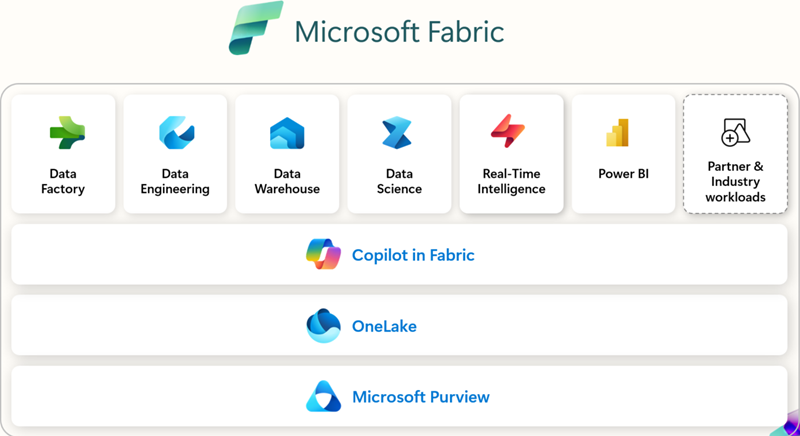
Microsoft Fabric 是一款面向企业级的端到端分析平台。它统一了数据流动、数据处理、数据导入、转换、实时事件路由和报表构建。它通过集成服务支持这些能力,如数据工程、数据工厂、数据科学、实时智能、数据仓库和数据库。免费注册,探索 Microsoft Fabric 60天——无需信用卡。
前提条件
在你开始使用 Microsoft Fabric 的 VS Code 扩展之前,你需要:
- Visual Studio Code:安装最新的 VS Code 版本。
- Microsoft Fabric账户:你需要访问Microsoft Fabric工作空间。你可以注册免费试用开始。
- Python:安装 Python 3.8 或更高版本,以便使用 Notebooks,用户数据功能在 VS Code 中运行。
安装与设置
你可以在Visual Studio Marketplace找到并安装扩展,也可以直接在VS Code中安装。选择扩展视图(⇧⌘X(Windows,Linux Ctrl+Shift+X)),搜索 Microsoft Fabric。
使用哪些扩展
| 扩展 | 最佳 | 主要特征 | 如果...... | 文献资料 |
|---|---|---|---|---|
| Microsoft Fabric 扩展 | 通用工作区管理、物品管理及物品定义作 | - 管理 Fabric 项目(湖屋、笔记本、管道) - Microsoft 账户登录和租户切换 - 统一或分组项目视图 - 使用 IntelliSense 编辑 Fabric 笔记本 - 命令调色板集成( 面料:命令) |
你需要一个扩展直接通过VS Code管理Fabric中的工作区、笔记本和项目。 | 什么是 Fabric VS 代码扩展 |
| Fabric 用户数据功能 | 开发者构建自定义转换和工作流程 | - 在 Fabric 中编写无服务器函数 - 带断点 的本地调试 - 管理数据源连接 - 安装/管理 Python 库 - 直接部署函数到 Fabric 工作区 |
你要构建自动化或数据转换逻辑,需要用 VS Code 进行调试 + 部署。 | 在VS代码中开发用户数据功能 |
| 织物数据工程 | 处理大规模数据和Spark的数据工程师 | - 探索湖屋(表、原始文件) - 开发/调试Spark笔记本 - 构建/测试Spark作业定义 - 本地VS Code与Fabric 之间的笔记本同步- 预览模式和示例数据 |
你使用Spark、Lakehouses或大规模数据管道,想要在本地探索、开发和调试。 | 在 VS Code 中开发 Fabric 笔记本 |
入门
安装并登录扩展后,你就可以开始作 Fabric 工作区和物品了。在命令面板(⇧⌘P(Windows,Linux Ctrl+Shift+P))中,输入 Fabric 以列出 Microsoft Fabric 特有的命令。
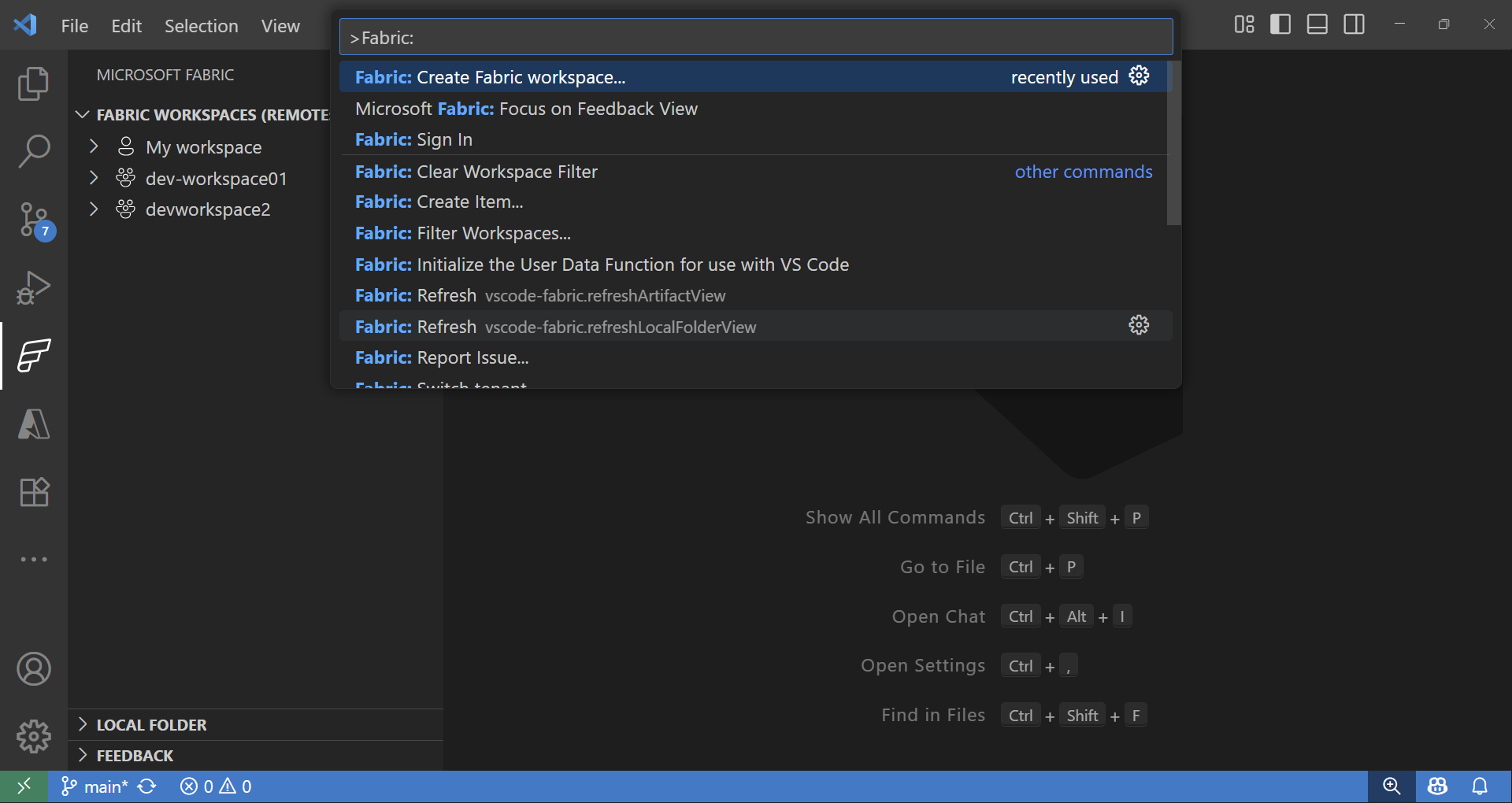
Fabric 工作区和物品探索器
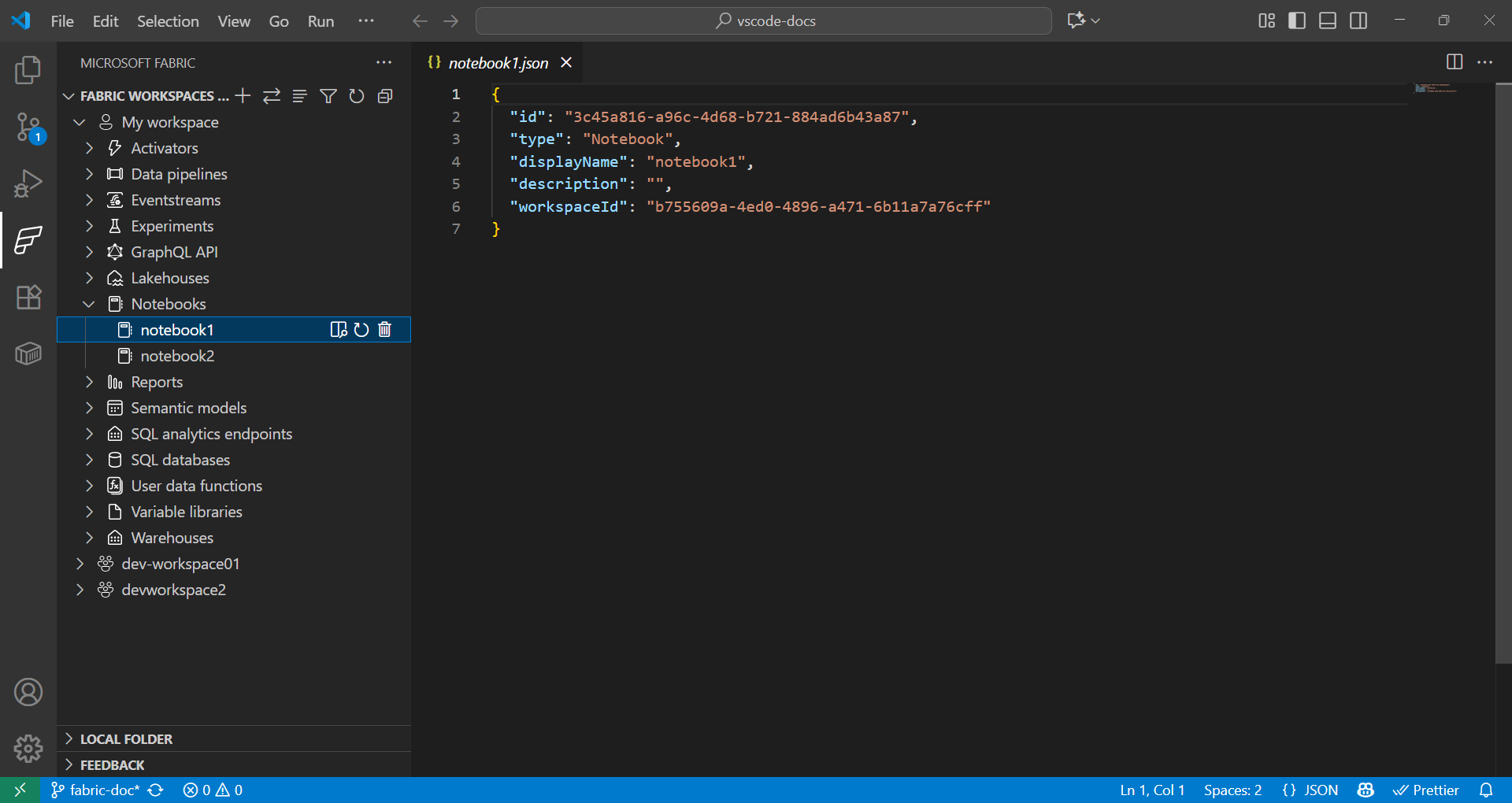
Fabric扩展为远程和本地Fabric项目提供了无缝处理方式。
- 在 Fabric 扩展中,Fabric 工作区部分列出了远程工作区的所有项目,按类型(湖屋、笔记本、管道等)组织。
- 在 Fabric 扩展中,Local 文件夹部分显示一个在 VS Code 中打开的 Fabric item 文件夹。它反映了你在 VS Code 中打开的每种类型的 fabric item 定义的结构。这使你能够在本地开发并将更改发布到当前或新工作区。
使用用户数据函数进行数据科学
-
在命令面板(⇧⌘P(Windows,Linux Ctrl+Shift+P))中输入 Fabric: Create Item。
-
选择你的工作区,选择用户数据功能。提供一个名称并选择Python语言。
-
你会收到通知,要你搭建Python虚拟环境,并继续在本地设置。
-
安装库时用
PIP安装或者在 Fabric 扩展中选择用户数据函数项来添加库。更新requirements.txt文件以指定依赖关系:fabric-user-data-functions ~= 1.0 pandas == 2.3.1 numpy == 2.3.2 requests == 2.32.5 scikit-learn=1.2.0 joblib=1.2.0 -
开门
functions_app.py.这里有一个使用 scikit-learn 开发数据科学用户数据函数的示例:import datetime import fabric.functions as fn import logging # Import additional libraries import pandas as pd from sklearn.ensemble import RandomForestClassifier from sklearn.preprocessing import StandardScaler from sklearn.model_selection import train_test_split from sklearn.metrics import accuracy_score import joblib udf = fn.UserDataFunctions() @udf.function() def train_churn_model(data: list, targetColumn: str) -> dict: ''' Description: Train a Random Forest model to predict customer churn using pandas and scikit-learn. Args: - data (list): List of dictionaries containing customer features and churn target Example: [{"Age": 25, "Income": 50000, "Churn": 0}, {"Age": 45, "Income": 75000, "Churn": 1}] - targetColumn (str): Name of the target column for churn prediction Example: "Churn" Returns: dict: Model training results including accuracy and feature information ''' # Convert data to DataFrame df = pd.DataFrame(data) # Prepare features and target numeric_features = df.select_dtypes(include=['number']).columns.tolist() numeric_features.remove(targetColumn) X = df[numeric_features] y = df[targetColumn] # Split and scale data X_train, X_test, y_train, y_test = train_test_split(X, y, test_size=0.2, random_state=42) scaler = StandardScaler() X_train_scaled = scaler.fit_transform(X_train) X_test_scaled = scaler.transform(X_test) # Train model model = RandomForestClassifier(n_estimators=100, random_state=42) model.fit(X_train_scaled, y_train) # Evaluate and save accuracy = accuracy_score(y_test, model.predict(X_test_scaled)) joblib.dump(model, 'churn_model.pkl') joblib.dump(scaler, 'scaler.pkl') return { 'accuracy': float(accuracy), 'features': numeric_features, 'message': f'Model trained with {len(X_train)} samples and {accuracy:.2%} accuracy' } @udf.function() def predict_churn(customer_data: list) -> list: ''' Description: Predict customer churn using trained Random Forest model. Args: - customer_data (list): List of dictionaries containing customer features for prediction Example: [{"Age": 30, "Income": 60000}, {"Age": 55, "Income": 80000}] Returns: list: Customer data with churn predictions and probability scores ''' # Load saved model and scaler model = joblib.load('churn_model.pkl') scaler = joblib.load('scaler.pkl') # Convert to DataFrame and scale features df = pd.DataFrame(customer_data) X_scaled = scaler.transform(df) # Make predictions predictions = model.predict(X_scaled) probabilities = model.predict_proba(X_scaled)[:, 1] # Add predictions to original data results = customer_data.copy() for i, (pred, prob) in enumerate(zip(predictions, probabilities)): results[i]['churn_prediction'] = int(pred) results[i]['churn_probability'] = float(prob) return results -
按F5在本地测试你的功能。
-
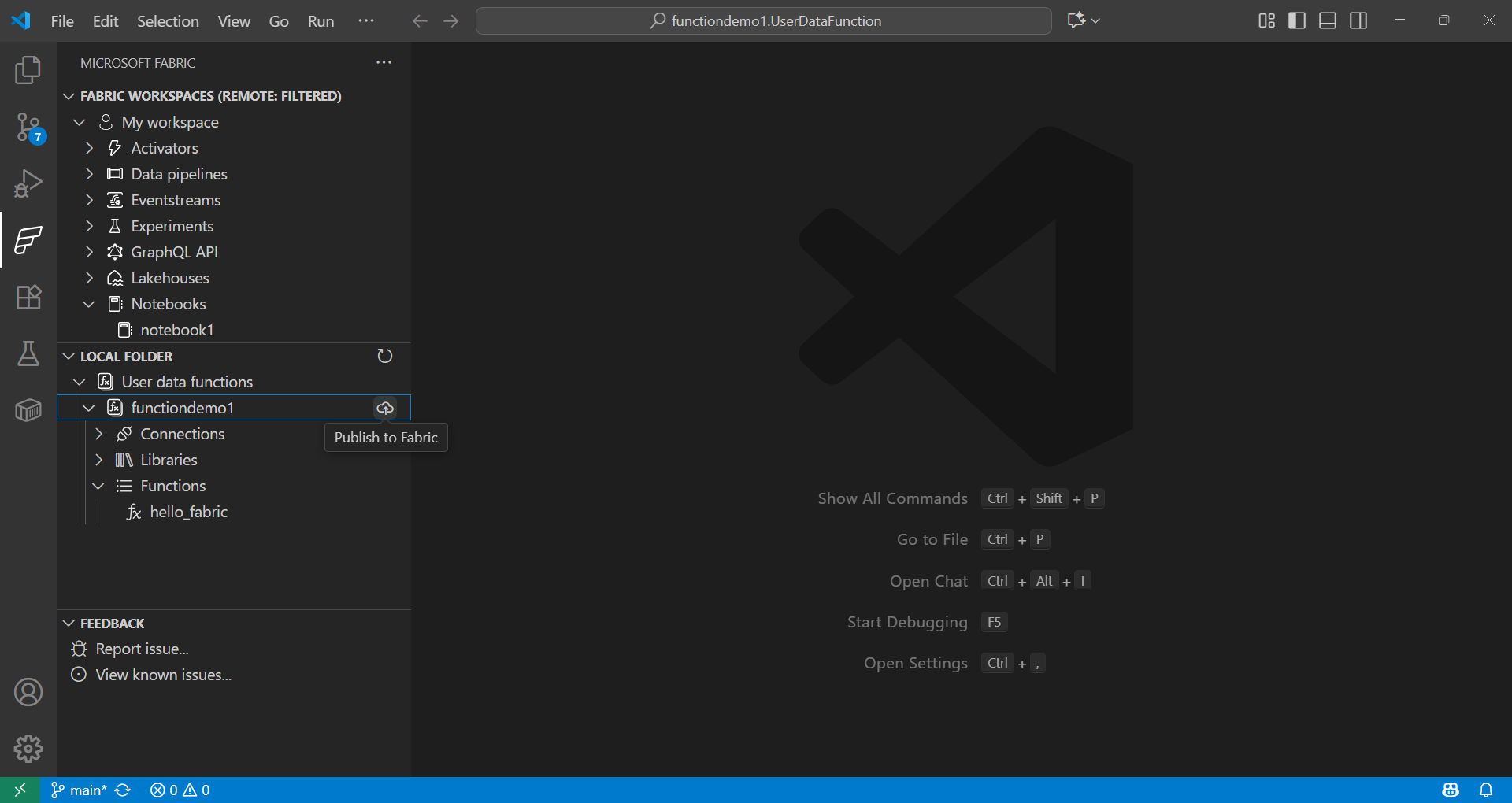
在 Fabric 扩展的本地文件夹中,选择该功能并发布到你的工作区。
了解更多关于调用该功能的信息,请访问:
使用Fabric笔记本进行数据科学
Fabric笔记本是Microsoft Fabric中的一本交互式工作簿,用于编写和运行代码、可视化以及并排的markdown。笔记本支持多种语言(Python、Spark、SQL、Scala 等),非常适合在 Fabric 中与现有 OneLake 数据进行数据探索、转换和模型开发。
示例
下面的单元格用 Spark 读取 CSV,转换为 pandas,并用 scikit-learn 训练逻辑回归模型。用你的数据集值替换列名和路径。
def train_logistic_from_spark(spark, csv_path):
    # Read CSV with Spark, convert to pandas
    sdf = spark.read.option("header", "true").option("inferSchema", "true").csv(csv_path)
    df = sdf.toPandas().dropna()

    # Adjust these to match your dataset
    X = df[['feature1', 'feature2']]
    y = df['label']

    from sklearn.model_selection import train_test_split
    from sklearn.linear_model import LogisticRegression
    from sklearn.metrics import accuracy_score

    X_train, X_test, y_train, y_test = train_test_split(X, y, test_size=0.2, random_state=42)
    model = LogisticRegression(max_iter=200)
    model.fit(X_train, y_train)

    preds = model.predict(X_test)
    return {'accuracy': float(accuracy_score(y_test, preds))}

# Example usage in a Fabric notebook cell
# train_logistic_from_spark(spark, '/path/to/data.csv')
请参阅 Microsoft Fabric Notebooks 文档以了解更多信息。
Git 集成
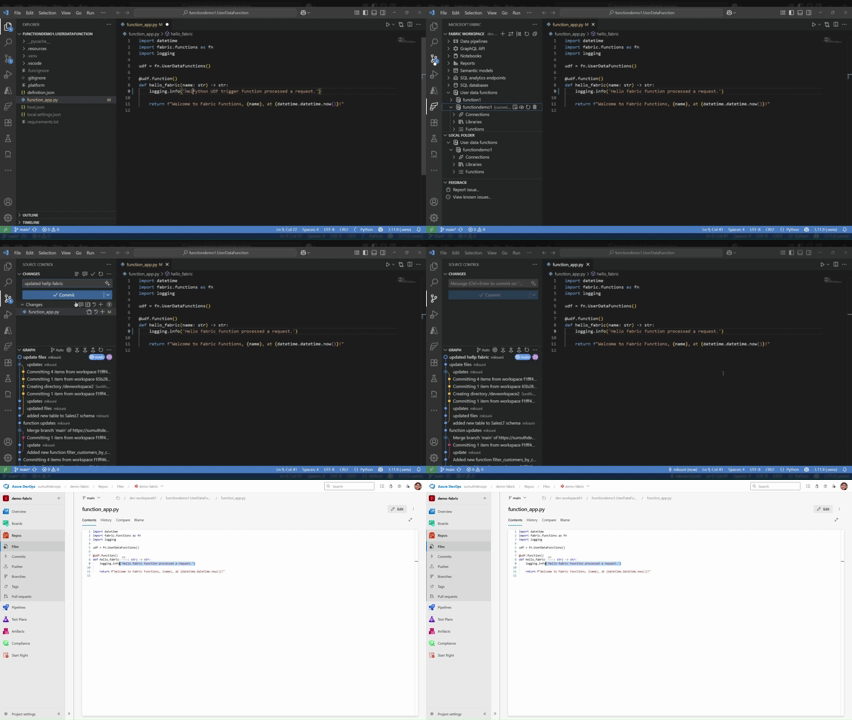
Microsoft Fabric 支持 Git 集成,实现数据和分析项目间的版本控制与协作。你可以将 Fabric 工作区连接到 Git 仓库,主要是 Azure DevOps 或 GitHub,只有支持的项目才会同步。该集成还支持 CI/CD 工作流程,使团队能够高效管理发布并维护高质量的分析环境。
下一步
现在你已经在VS Code中搭建了Microsoft Fabric扩展,请浏览以下资源以加深你的知识:
与社区互动并获得支持: